Quickstart
Install
Python 3.12 or newer. Add extras for what you use, for example pip install "squeakycleantext[datasets,gpu]":
| Extra | Why you need it |
|---|---|
datasets, datatrove |
Clean Hugging Face datasets or DataTrove pipelines |
langchain, haystack |
Clean documents in RAG pipelines |
gpu |
Run NER on an NVIDIA GPU |
synthetic |
Replace personal data with fake values |
score |
MinHash signatures for near-duplicate removal |
gliner |
Your own entity labels, and ner_mode="pii" (58 PII labels) |
mcp |
Run SCT as an MCP server for AI assistants |
All extras: docs/INSTALL.md.
Quickstart
For training and RAG data, use the training preset. It repairs the text and replaces personal data. Numbers, dates, HTML, case, line breaks and code stay as written.
from sct import TextCleaner, preset_config
from sct.score import score_record

cleaner = TextCleaner(cfg=preset_config("training"))
for r in cleaner.process_batch([
    "I’m Anna Berg & my mail is anna@example.se. Order 4711 ships on 2024-05-01.",
    "Bel +31 20 123 4567 voor Jan de Vries.",
]):
    row = score_record(r)
    print(r.lm_text)
    print(row["sct_language"], row["sct_pii_count"], row["sct_pii_types"])
# -> I'm <PERSON> & my mail is <EMAIL>. Order 4711 ships on 2024-05-01.
# -> ENGLISH 2 ['EMAIL', 'PERSON']
# -> Bel <PHONE> voor <PERSON>.
# -> DUTCH 2 ['PERSON', 'PHONE']
The first run downloads the NER models.
A whole Hugging Face dataset (datasets extra). clean_dataset wraps Dataset.map: batch_size, num_proc and other map arguments pass through. output="new_column" keeps the original text next to the cleaned text_clean, and score=True adds the sct_* columns.
from datasets import Dataset
from sct.integrations.hf import clean_dataset

if __name__ == "__main__":
    ds = Dataset.from_dict({"text": ["Mail jan@example.nl", "Call Maria Chen on +44 20 7946 0958."]})
    ds = clean_dataset(ds, columns=["text"], output="new_column", score=True, num_proc=2)
    print(ds[1]["text_clean"], ds[1]["sct_pii_types"])
    # -> Call <PERSON> on <PHONE>. ['PERSON', 'PHONE']
Full cleanup for classic ML. The default config (TextCleaner()) also replaces ID-shaped numbers, dates and HTML, and stat_text gives a lower-cased version without stopwords and punctuation:
from sct import TextCleaner

result = TextCleaner().process("I’m Anna Berg & my mail is anna@example.se. Order 4711 ships on 2024-05-01.")
print(result.lm_text)    # -> I'm <PERSON> & my mail is <EMAIL>. Order <NUMBER> ships on <DATE>.
print(result.stat_text)  # -> person mail email number ships date
What you get back
process and process_batch return a ProcessResult:
lm_text: the cleaned text, sentences intact, for LLMs, RAG and training.stat_text: lower-cased, without stopwords and punctuation, for classic ML models.language: the detected language.signals: a value-free view with the same keys for every input: language and confidence,pii_count,pii_share,pii_types,sensitive(pii_count > 0), warnings and the NER models that ran. Safe to log or store next to the text.metadata: the same counts, plus raw values only when you ask for them (the reversible map, orfindingswithinclude_entities=True). Keep those out of logs.
score_record turns a result into flat sct_* columns for filtering and data cards. ScoreConfig adds an optional quality score and a MinHash signature. Fields: docs/API.md, columns: docs/SCORE.md.
| PII mode | Output | Use it for |
|---|---|---|
placeholder (default) |
<PERSON> lives in <LOCATION>. |
Training and RAG data |
synthetic (synthetic extra) |
Fake values, for example Patty Hunter lives in East Bobbyfurt. (the same document always gets the same fakes) |
Data that must still read naturally |
reversible |
<PERSON_0> lives in <LOCATION_0>. plus a map |
Sending text to an LLM and restoring the answer |
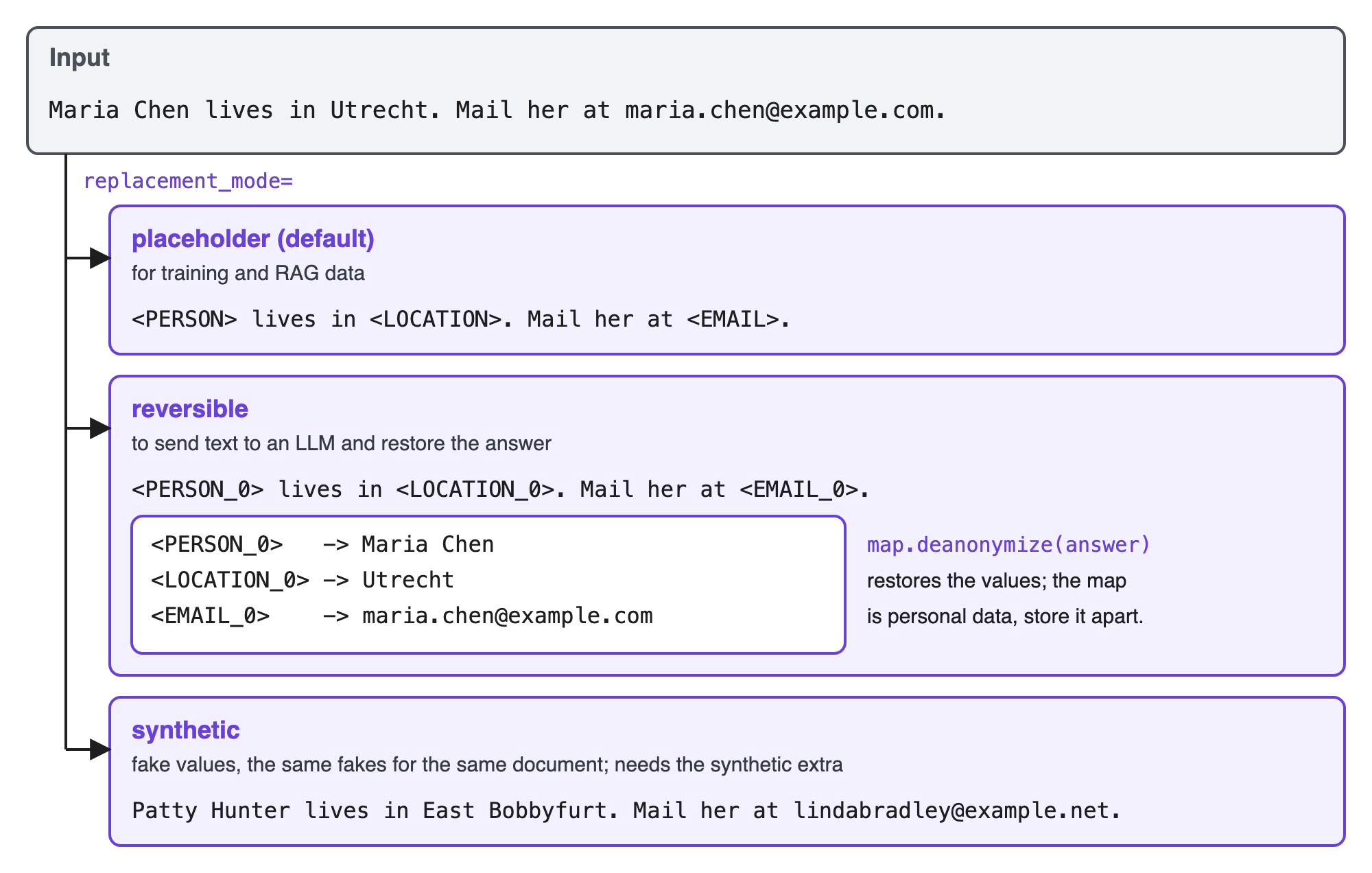
Modes, privacy policies and more PII types (ner_mode="pii"): docs/REPLACEMENT_MODES.md, docs/PRIVACY.md, docs/NER_BACKENDS.md.
Next steps
- Pick a preset or change a field: Configuration.
- Clean a Hugging Face dataset, DataTrove pipeline or LangChain/Haystack documents: Integrations.
- JSON, DataFrames, RAG chunks and streams: Adapters.